
Help Center
Auto-Updating Review Widgets
Connect a location's review platform listings once and the Reviews element renders real, always-current reviews on the published site, with no redeploy involved.
Last updated
Connected review widgets pull each location's reviews from the platforms where they actually live (Google, Facebook, Yelp, Trustpilot, BBB, and many more) and render them in a widget that keeps itself current. You publish and deploy the page once; from then on new reviews arrive on their own.
The review data comes through a provider called Zembra, with Wextractor available as a per-source fallback. Both are third-party services with their own accounts and usage-based pricing; the platform ships wired for them, but the accounts are yours.
One-Time Configuration#
-
Create a Zembra account and copy the live API token from its settings, then set it on your CMS service:
ZEMBRA_API_TOKEN=<live token>Removing the token is not an off switch: listings already connected keep billing, and a source saved while the token was missing is connected and billed on the first sync after one is set. To stop the spend, disconnect every source first and remove the token last.
-
Register the webhook listener in the Zembra dashboard (their dashboard is the only place to do this): point it at
https://<your-cms-host>/api/reviews/webhook/zembra, all review events, payload style "Only changes", frequency "right away". -
The daily sync ships with the platform as one of your CMS's scheduled jobs (GitHub runs it until you run
npx pnpm run setup:scheduler), using the cron secret you already configured during setup. It reconciles every source's full review set daily, so even a missed webhook heals itself. -
Optional fallback: set
WEXTRACTOR_API_TOKENand flip a source's provider to Wextractor if a platform ever breaks on the default provider. Google through the fallback requires the location's Place ID.
Connecting a Location's Listings#
In Locations, edit a location and find the Review platforms card. Pick the platform or just paste the listing's public URL, and the platform is detected from the link. Connect, and the backfill of existing reviews lands within minutes. Sync now re-polls a connected source; on a source that is not connected yet it connects it, which starts that listing's paid subscription.
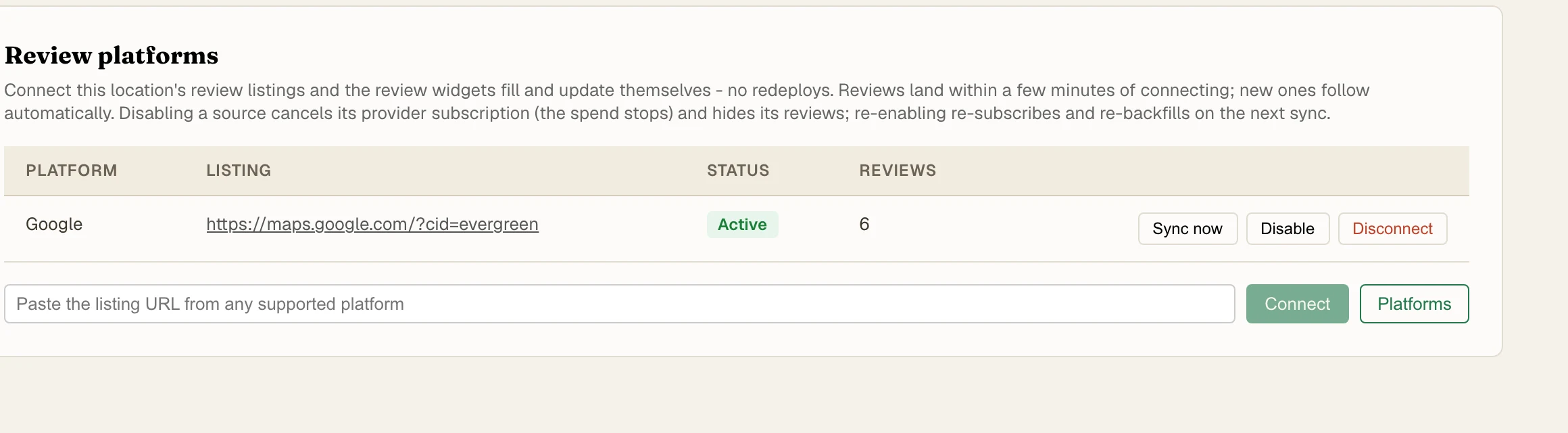
Connecting is operator-only because it spends provider credits. Roughly, a new source costs a setup amount and a smaller monthly amount in credits, at fractions of a cent per credit; check the provider's current pricing before connecting many sources.
Pointing a Widget at the Reviews#
In the builder, drop a Reviews element and set its source to Connected:
- Scope: "This page's location" follows the page and section location binding, exactly like
{{location.*}}tokens; "All locations" is the site-wide widget. - Layout: grid, carousel, or list, with a cap on how many reviews show.
- Header: an aggregate bar with the overall rating, platform tabs, and a Write a review link.
- Styling: card background and outline colors.
Publish and deploy the page once. New reviews then arrive through the webhook and a scheduled reconciliation, and the widget content is only briefly cached, so no tenant redeploy is ever involved.
The Honesty Rules#
These are deliberate and should not be worked around:
- The aggregate rating shown is always computed over every includable review in scope, never just the page of reviews on display, and there is no rating filter on the widget. Silently suppressing negative reviews from a display that presents itself as the business's reviews is the kind of practice regulators fine for; the hidden flag on a review row exists for spam and abuse moderation only.
- Every review keeps its platform attribution linking back to the source.
- Deleting a source disconnects its provider job and removes its reviews from widgets. The per-source enabled toggle is the softer switch: it cancels the provider subscription so the spend stops, hides that source's stored reviews, and deletes nothing. Re-enabling re-creates the subscription and re-backfills, which costs the setup credits again, so treat it as a pause rather than a free toggle.
Related#
- Interactive Elements - the Reviews element's full settings
- Smart Locations - how the location binding decides whose reviews show