
Help Center
Hosting and Domains
How Seedly Sites hosts client sites - static hosting on Cloudflare Pages, one project per client, custom domains, and what it actually costs to run.
Last updated
Seedly Sites separates the platform you run from the sites your clients' visitors see. The CMS and builder live on your server; every client site deploys as pure static files to its own Cloudflare Pages project. This page covers the hosting model, domains, and the honest economics.
The Hosting Model#
| Piece | Where it runs | Who sees it |
|---|---|---|
| CMS + portal + builder | Your Railway instance | You and your clients (logged in) |
| Client sites | Cloudflare Pages, one project per client | The public |
| Media (images, video) | Cloudflare R2 storage | The public, via each site |
One project per client. When you create a site in the portal, the platform provisions a dedicated Cloudflare Pages project for it automatically. Deploys, domains, and traffic are isolated per client - one site's deploy can never affect another's.
Static output. A deploy builds the site's published content into plain HTML and CSS with no runtime framework. There is no origin server to slow down, crash, or patch; the CDN serves finished pages from locations near the visitor.
That architecture is the performance story: static pages on a global CDN are fast by default, which is exactly what Core Web Vitals reward. See the hosting overview for the marketing-level summary.
Domains#
The Built-In Preview Address#
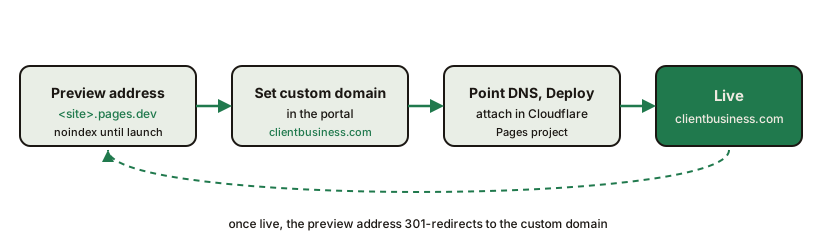
Every site gets a <project>.pages.dev address from its Cloudflare Pages project. Its behavior depends on whether the site has launched:
- Before a custom domain is set - the preview address serves the site but is marked not-for-indexing and blocks crawlers, so an unfinished client site cannot leak into search results.
- After a custom domain is set - the preview address permanently redirects (301) to the custom domain, path preserved, so any links or rankings consolidate onto the real domain.
Use the preview address for internal review and client sign-off before go-live.
Connecting a Custom Domain#
- In Cloudflare, open the site's Pages project, choose Custom domains > Set up a domain, and add the record Cloudflare shows at your registrar. A subdomain such as
www.clientbusiness.comworks from any DNS provider. A bare domain such asclientbusiness.comneeds Cloudflare to run its DNS first: move its nameservers to Cloudflare, then add the custom domain - Set the same domain as the site's Custom domain. The Create new site form has the field when you create a site. For a site that already exists, set it in
/admin: open Tenants, open the site, and fill in Custom domain in the right-hand sidebar. Saving it also attaches the domain to the site's Pages project - Deploy the site. Saving the domain is not a content change, so if the sidebar Deploy button says Up to date, open a page that is already published and has no unpublished edits, open its three-dot menu, choose Settings, and click Save & deploy. Save & deploy publishes the page it is on, so never use it on a draft
From this deploy on, the site's canonical URLs, sitemap, and structured data all use the custom domain, and the preview address redirects to it.
Moving a Domain from an Old Site#
If the client is migrating from an existing site, set up 301 redirects for any URLs that changed as part of the migration. Redirects are managed per site in the portal and ship with every deploy.
What Hosting Actually Costs#
Being straight about this, because "free hosting" claims usually hide something:
| Cost | What it covers | Scale behavior |
|---|---|---|
| Railway (CMS) | The platform: CMS, portal, builder, database | Shared across ALL client sites; grows with usage, not site count |
| Cloudflare R2 | Media storage + delivery | Usage-based; typically small |
| Cloudflare Pages | Serving every client site | Free static hosting tier |
| SendGrid | Password resets, client intake links, and job-failure emails | A paid plan once the trial ends; grows with email volume, not site count |
| Anthropic API | AI site generation, client intake analysis, port revision, and visual QA | Pay per use; costs nothing while no AI job is running |
Connected review widgets, if you use them, are the one cost that grows with each connected listing.
So: serving a client site costs you nothing per site, but running the platform is not zero-cost - the CMS host, media storage, and email are real (modest) monthly costs you pay once for the whole fleet, and AI generation is billed by use. There are no per-site platform fees and no per-seat fees; adding your 30th client site costs the same as adding your 3rd.
Reliability Notes#
- A deployed site keeps serving its pages even if your CMS is down. The only parts of a live page that load from your CMS, such as a connected review widget and the site's own visitor analytics, depend on it being reachable
- Deploys are atomic: visitors see the old build until the new one fully ships
- Each site's sitemap, robots, redirects, and 404 handling are regenerated on every deploy
Summary#
- One Cloudflare Pages project per client site, auto-provisioned
- Static HTML output, no runtime framework, CDN-served
- Preview address is noindexed pre-launch and 301s to the custom domain after
- Hosting the sites is free-tier; running the platform (Railway + R2) is a real but shared cost
Frequently asked questions
- Is hosting really free?
- The static client sites serve from Cloudflare Pages' free static hosting tier, so serving traffic costs nothing per site. The platform itself is not zero-cost - you pay for the CMS host (Railway) and media storage (R2), which are shared across all your client sites.
- Why are the sites so fast?
- Every deploy produces plain static HTML with no runtime framework. There is no server rendering a page per request and no client-side app to boot - the CDN serves finished pages directly.
- Can each client have their own domain?
- Yes. Every client site has a custom domain field. Point the domain's DNS at that site's Cloudflare Pages project and deploy; the preview address then permanently redirects to the real domain.
- What is the pages.dev address for?
- It is the site's built-in preview address. Before a custom domain is set, it serves the site but tells search engines not to index it. After a custom domain is set, it redirects to the real domain so rankings consolidate in one place.
- Does adding more client sites raise my hosting bill?
- Barely. Each new site is another free-tier static project. Your real costs stay in the shared CMS and media storage, which grow slowly compared to the number of sites.