
Docs
Architecture
How Seedly Sites is put together - a multi-tenant CMS and builder on your app host, publishing static client sites to Cloudflare Pages.
Last updated
Seedly Sites splits cleanly into two halves: the platform you and your clients log into, and the static sites your clients' visitors see. Understanding the split explains why published sites are fast, cheap to host, and safe to edit.
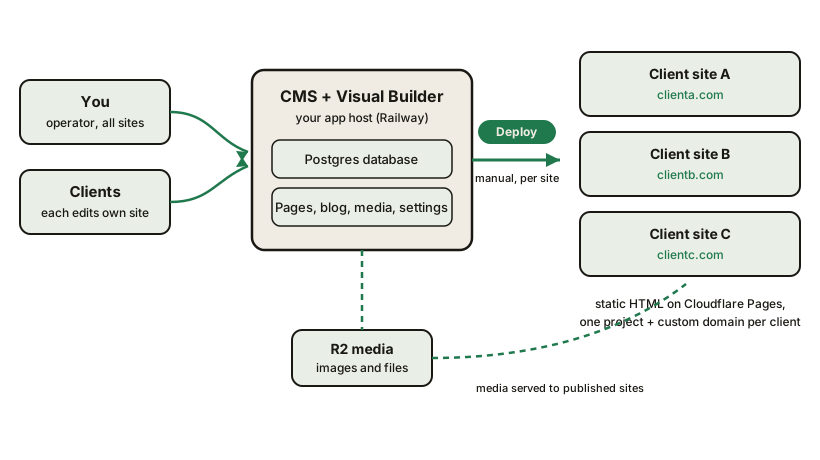
The Platform Half#
The CMS and the visual builder run as an application on your app host (Railway is the supported setup), backed by a Postgres database.
- The CMS holds every tenant's pages, blog posts, media records, redirects, settings, and users, with strict per-tenant scoping. Operators see all tenants; a client user is scoped to their own site.
- The visual builder runs alongside the CMS on the same origin. Pages are stored as a structured element tree (Section, Row, Column, Element), not as rendered HTML, which is what makes them editable, restyleable, and portable.
- Media uploads land in R2 object storage and are served to published sites from each site's own domain.
This half is the only part with a server and a database. It is where you and your clients sign in, and it also runs the platform's scheduled jobs (publishing posts you scheduled, the automatic backup, and routine clean-up sweeps). npx pnpm run setup:scheduler switches off GitHub's duplicate copies.
The Published Half#
When you press Deploy, the platform renders the tenant's published content into plain static files - HTML and CSS with no runtime framework - and pushes them to that client's own Cloudflare Pages project, created automatically when the site is created. Each deploy also regenerates the site's sitemap, robots rules, and redirects.
- One project per client site. Every tenant gets its own Pages project and its own custom domain. Client sites never share a URL namespace.
- Static by architecture. A visitor request is served from Cloudflare's edge as a prebuilt file. There is no database call, no origin server, and no plugin stack in the request path, which is why the output is fast and Core Web Vitals friendly by default.
- Portable output. The published site is self-contained static markup. If a client ever leaves, their site is exportable in a form any static host can serve.
Why the Split Matters#
- Editing is decoupled from serving. The CMS can be updated, restarted, or even down and every live client site keeps serving its pages. The only parts of a live page that load from your CMS, such as a connected review widget and the site's own visitor analytics, depend on it being reachable.
- Publish is not Deploy. Publishing marks content live in the CMS; the static site changes only when you deploy. Every change to a live site is a deliberate, manual deploy, by you, or a client whose login has Can deploy this site switched on, with a readiness check in front of it. See Core Concepts.
- Costs stay flat. You pay for one app host and media storage regardless of how many sites you run. The static hosting side scales on Cloudflare's free static tier. Hosting is not zero-cost, but it does not grow per site the way per-site subscriptions do. See Hosting & domains.
Knowing an Update Actually Landed#
A healthy-looking dashboard is not the same thing as an update being complete. Your cms service runs its database migrations each time it starts, before the server boots, so if a migration fails the new version never starts and your previous version usually keeps serving. Judge an update by the cms deploy's status and log, not by the site being up.
There is a deep health check for exactly this: it reports whether the running code and the database agree, so you can confirm an update rather than infer it from a green deploy. Use it after any update that lists migrations. See Updating.
Domains#
Each tenant serves on its own custom domain, connected in Cloudflare. The platform's preview URLs are kept out of search engines so only the client's real domain ranks. See Hosting & domains for the setup walkthrough.
Where Your Data Lives#
Everything is on infrastructure you control: content and settings in your Postgres database, media in your R2 bucket, published files in your Cloudflare account, and the publish pipeline in your private GitHub repository. Backups and exports are built in - see Backups & disaster recovery.