
Help Center
Users and Roles
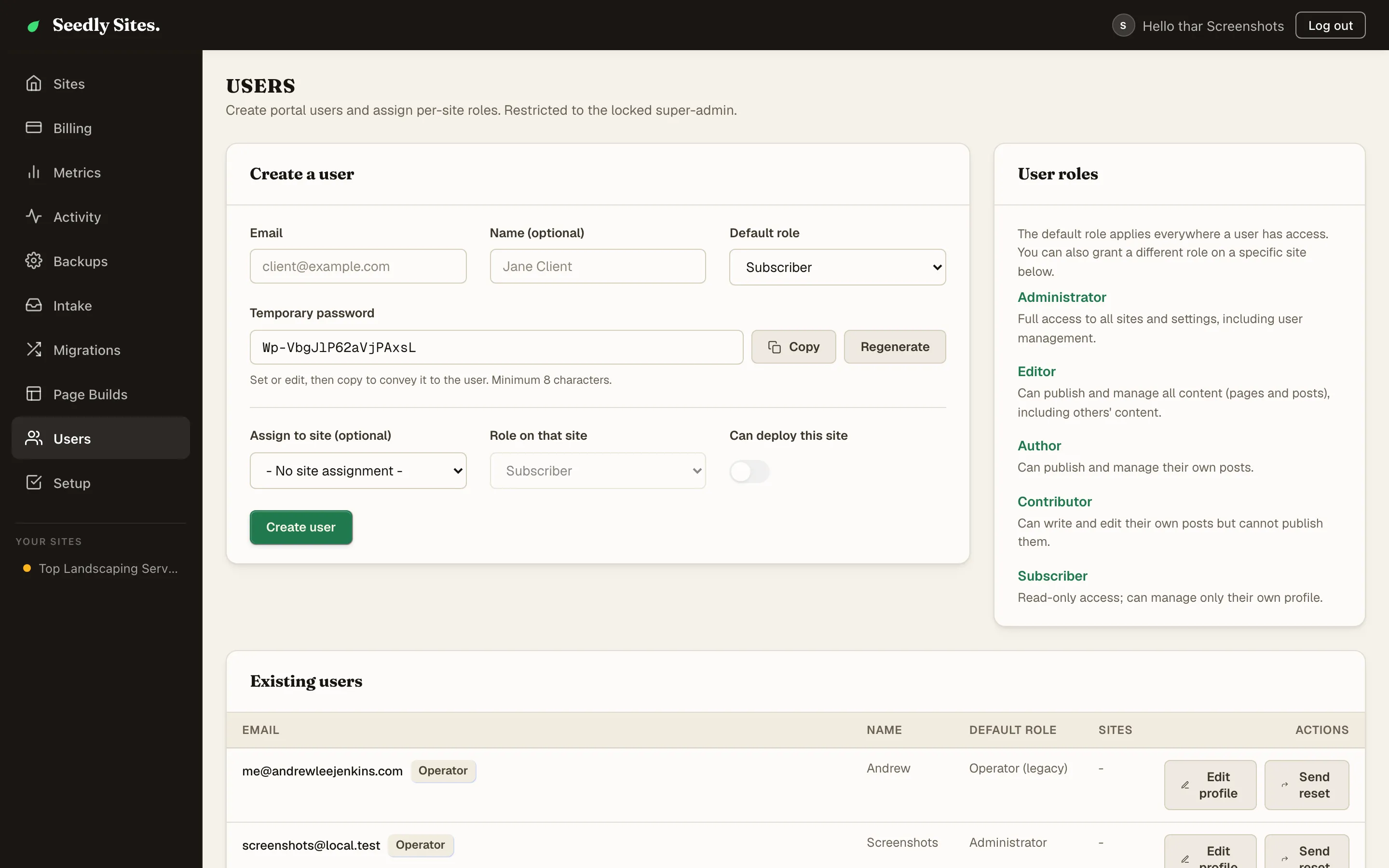
The Seedly Sites permission model - five WordPress-style site roles, the operator superAdmin, per-site role overrides, and deploy permission.
Last updated
Seedly Sites uses a two-level permission model: five familiar WordPress-style roles that control what a user can do within a site, plus a single operator flag that sits above every site. Access is always scoped - a client invited to their site can never see another client's site.
This is the canonical roles reference; other pages link here rather than restating the rules.
Site Roles#
Every user has a role that controls their capabilities inside a site:
| Role | Create content | Edit others' content | Publish | Site settings | Media |
|---|---|---|---|---|---|
| Administrator | Yes | Yes | Yes | Yes | Yes |
| Editor | Yes | Yes | Yes | No | Yes |
| Author | Yes | Own only | Yes | No | Yes |
| Contributor | Yes | Own only | No (drafts only) | No | No |
| Subscriber | No | No | No | No | No |
Notes on the boundaries that matter in practice:
- Editor vs Administrator: an Editor manages all content and can publish, but cannot touch site settings, locations, redirects, or tracking scripts. Administrator is the "trusted client owner" role; Editor is the safe default for a client who edits content.
- Author vs Contributor: both work only on their own content; an Author can publish it, a Contributor can only submit drafts for someone else to publish.
- Subscriber is read-only - useful for a stakeholder who should see the portal but change nothing.
Roles in the Builder#
The role also shapes the visual builder itself:
| Role | Builder mode |
|---|---|
| Administrator, Editor | Full editing - add, move, delete, and restructure anything |
| Author, Contributor | Content editing - change text and media inline, but not the page structure |
| Subscriber | View only |
The Operator (superAdmin)#
The superAdmin flag marks the agency operator - you. It is not a sixth role; it sits above the role system:
- Sees and manages every site and agency in the instance
- Full administrator capabilities everywhere
- Exclusive access to operator tooling: creating sites, migrations, billing overview, backups, exports, and the operator dashboard
- Only a superAdmin can create or delete users, or change anyone's role or privilege fields - users can never promote themselves. The dashboard's Users page appears only for the account whose email matches
SUPER_ADMIN_EMAILon your cms service
Guard this flag accordingly: superAdmin accounts are for you and people you trust with the whole platform.
Default Role vs Per-Site Overrides#
A user has one default role, and optionally a different role per site:
- The default role applies on any site the user is linked to without an override
- A per-site link can override the role for that site only
Example: a marketing freelancer could be an Author by default but an Editor on the one site they manage end to end.
When you invite a client, link them to their site with the role they should have there. That link is also what scopes their access - no link, no access.
Per-Site Deploy Permission#
Whether a user may press Deploy is a separate per-site setting, deliberately independent of role:
- The operator can always deploy
- For everyone else, deploy permission is granted or revoked per user, per site. When you create a user on the Users page and assign them to a site, Can deploy this site starts switched on, so switch it off if go-live should stay with you. A site link with no deploy setting of its own (for example one added in the raw admin) lets only a site Administrator deploy
This lets you give a client full Editor content control while keeping go-live in your hands, or the reverse - a low-touch client who deploys their own approved changes. Context on what deploying does: Deploying a Site.
Inviting a Client#
- As the operator, create the user with their email address
- Set their default role (usually Editor for a hands-on client)
- Link them to their site
- Decide their per-site deploy permission
- Send them their login details, or have them use the password reset flow on the branded login page
They sign in through your branded login screen and land scoped to their site. What that experience looks like from their side is covered in the Client Guide.
Signing In and Account Emails#
- Sign-in is email + password on your instance's branded login screen
- Password reset emails send automatically once your instance has an email provider configured (a SendGrid API key, set during provisioning). There is no invitation email: you create a client's login and send them the temporary password yourself. Without an email provider the platform still runs, but a password reset cannot be delivered and the reset link is never written to the server logs, so configure the provider before you rely on resets
Two-Factor Authentication#
Turn on two-factor authentication from your account settings, inside the dashboard, using any authenticator app. You get recovery codes when you enable it. Store them somewhere you can reach without being logged in, because they are how you get back in if you lose the device.
Each code is single-use, and each login code can only be accepted once, so a code cannot be reused even if two sign-in attempts happen at the same moment.
Step-Up Prompts#
Some screens ask you to confirm your second factor again even though you are already signed in. These are the administrative surfaces where a hijacked session would do the most damage. It is a prompt, not a separate login, and confirming it carries through to the visual builder, so you can edit normally afterwards.
Before you turn it on for the operator account, move your automation off its password. The publish pipeline and the builder's preview service can sign in with your operator email and password, and a password sign-in is refused once that account has a second factor, so deploys would stop. First mint an API key for the pipeline and the pagebuilder service, give the intake and migration runs a login of their own without two-factor, and run one deploy to confirm it goes green. Only then enroll. Chapter 09 of your handbook has the exact steps. The clone command signs in with your browser session, so run it before you enroll.
If you turn two-factor on for the operator account, do it before handing client logins out, so you are not re-authenticating in front of a client mid-handover.
Summary#
| Level | Controls |
|---|---|
| superAdmin | Everything, everywhere - the operator |
| Default role | The user's baseline capabilities |
| Per-site role override | Different capabilities on a specific site |
| Per-site deploy permission | Whether they can press Deploy, independent of role |