
Help Center
Migrating an Existing Site
Port a client's existing website into Seedly Sites - the migrate command, the parity gate, what carries over for SEO, and what needs rebuilding.
Last updated
Porting is one of the three ways to fill a new client site with content: point the migration tool at the client's existing website and it reproduces the site in the builder - structure, content, styling, brand, and blog - ready for review. This is how you take over a site without rebuilding it from scratch.
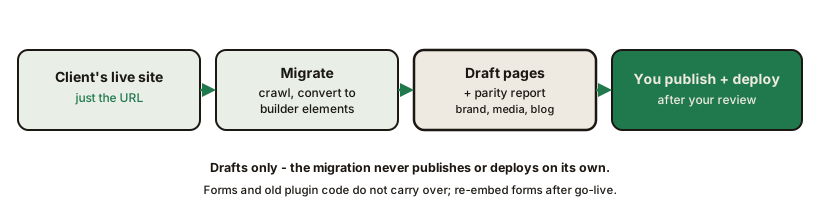
You can run a migration from the command line, below, or from Migrations in the operator sidebar: paste one site address per line, queue them, then press Dispatch batch to run the ports on your GitHub Actions. Each job gets its own page where you check the harvested brand and publish its drafts. The batch route suits several sites at once; the command line gives you the flags.
What a Migration Does#
Given the site's URL, the migration:
- Discovers the pages (from the site's own page listing or sitemap)
- Extracts each page with a real browser, capturing the rendered structure and computed styling
- Converts everything to builder elements - real sections, rows, columns, headings, images, buttons, accordions - not screenshots or frozen HTML
- Captures the brand - colors, fonts, and site chrome are written into the site's settings
- Imports media into your storage and remaps internal links so pages point at each other, not at the old site
- Imports the blog as posts
- Persists every page as a draft in the target site
Because pages become native builder elements, the ported site is fully editable afterward - the migration is a starting point you own, not a locked-in copy.
The migrator is built for WordPress sites and tuned for ones built with the YOOtheme page builder. Other sites go through a more general capture, so check the parity report closely on those.
Drafts Only, Always#
A migration never publishes and never deploys. Every page lands as a draft for your review. If imported images could not be brought into your own media storage, the affected pages are held as drafts and the tool tells you which URLs to fix - so a half-imported site cannot leak live.
Running a Migration#
From the platform repo, with your CMS running:
npx pnpm --filter @seedly-sites/cli seedly migrate https://the-client-site.com \
  --tenant client-slug \
  --cms-base https://your-cms.example.com
There is no bare seedly command on your machine; the CLI runs through pnpm from the platform folder. migrate signs in with your operator email and password, passed as --email and --password or set as PAYLOAD_EMAIL and PAYLOAD_PASSWORD.
The target site is found or created by slug. Useful flags:
| Flag | Use |
|---|---|
--dry-run | Extract and convert without persisting - inspect the result first |
--only home,about,services | Port just these pages |
--limit 3 | Port the first few pages (testing) |
--blog-only | Skip pages; import or re-import only the blog |
--qa | Capture source-vs-result screenshots and score similarity after the run |
The Parity Gate#
After porting, diff each page against the live original:
npx pnpm --filter @seedly-sites/cli seedly parity home \
  --orig https://the-client-site.com \
  --ours http://localhost:4321/site/client-slug
The parity check compares section by section - structural content plus desktop and mobile screenshots - and prints a coverage report: clean sections, sections with gaps, and anything dropped. Migration runs are also tracked in the portal's migration board, where each page carries its parity signal for triage.
Work the gaps in the builder before publishing anything.
Honest Expectations: What Carries and What Does Not#
Migration reproduces the site closely - then you finish in the builder. It is not pixel-perfect and we will not pretend otherwise; the parity report exists precisely to show you the remaining distance.
Carries over:
- Page structure, text, images, and styling as native builder elements
- Brand colors, fonts, and chrome
- Blog posts
- Page titles and meta descriptions
- Internal links, remapped to the new site
Handled at go-live (by you, with platform support):
- 301 redirects for any URLs that changed - managed per site and shipped with every deploy
- Sitemap - regenerated automatically on every deploy
- External backlinks - links on other websites keep working only via the 301s you set up; there is no way for any platform to edit other people's sites
Does not carry over:
- Forms - a scraped form would post to the old host, so forms arrive as placeholders. Re-add each one as an embed (Forms)
- Custom plugin code from the old platform - anything that ran server-side or as a proprietary plugin needs a native or embedded replacement
- Domain-locked widgets (some review and booking embeds) render blank until the real domain goes live - do not "fix" these pre-launch
The Full Takeover Flow#
- Create the client site (or let
migratecreate it by slug) - Run the migration; inspect with
--dry-runfirst if the site is unusual - Run the parity check per page; fix gaps in the builder, native fields first
- Re-embed forms; note any domain-locked widgets for post-launch
- Review and publish the pages
- Set up 301 redirects for changed URLs
- Set the custom domain and deploy
One rule to respect: migration is a one-time initial import. Re-run it only before hand-editing begins - after takeover, the builder is the source of truth.
Summary#
| Question | Answer |
|---|---|
| Input | The live site's URL |
| Output | Draft pages of native builder elements + brand + media + blog |
| Fidelity | Close, verified per page by the parity gate |
| Publishes anything? | Never - drafts only, you publish and deploy |
| Forms / plugins | Do not survive - re-embed forms, replace plugin behavior |
| SEO | 301s + carried-over titles and descriptions + remapped internal links + regenerated sitemap |
Frequently asked questions
- Will the migrated site look identical to the original?
- Close, not identical. The migration reproduces structure, content, and styling closely, then a parity report shows exactly where the gaps are so you finish the last stretch in the builder.
- Will the client lose their Google rankings?
- The SEO mechanics are handled - 301 redirects for changed URLs, page titles and meta descriptions carried over, internal links remapped, and a fresh sitemap on every deploy. Backlinks on other websites keep working only through the 301s you set up, so review the redirect list before go-live.
- Do contact forms survive the migration?
- No. A scraped form would still post to the old website, so forms come through as placeholders. Re-add each form as an embed from your form or CRM provider - see the Forms guide.
- Can a migration accidentally overwrite the live site?
- No. Every ported page lands as a draft. Nothing publishes and nothing deploys until you review and do both yourself.
- Can I re-run a migration?
- Only before you start hand-editing. Migration is a one-time initial import per site; after you take over in the builder, re-porting would clobber your work - maintain the site by hand from then on.