
Help Center
Generating a Site from Brand Inputs
The generate-from-brand-DNA flow - a client intake questionnaire, a brand and keyword-grounded page plan, copy written in the client's voice, honesty gates, and the review checkpoints before you deploy.
Last updated
Generating is one of the three ways to fill a new client site. Instead of porting an existing site or cloning a live one, you build a fresh site from the client's brand inputs. This is how you deliver a site to a client who has no website worth keeping, or none at all.
The output is a set of draft pages built from real builder sections, written in the client's voice, structurally unique to that client, and checked for honesty as it is saved, with anything unsupported flagged for your review. You review the draft and finish it in the builder, then deploy.
How Intake Works#
You invite the client, they receive a link to a guided intake questionnaire, and they fill it in themselves: their business details, brand, proof points, and the voice inputs that make the copy sound like them. Their answers drive the generated site directly.
Start one from Intake in the operator sidebar: enter the business name, press Start intake, then Send intake link. The link is emailed to the client when a contact email is on file and your mailer is set up, and it is always shown on the board so you can copy it and send it yourself.
It works both ways. The client can complete the questionnaire on their own, or you can walk them through it on a call or fill it in on their behalf when that is easier. Either way the answers feed the same brand-and-plan pipeline, the client only ever supplies inputs and approves a couple of checkpoints, and they never touch the live site.
The Quick Generate Form#
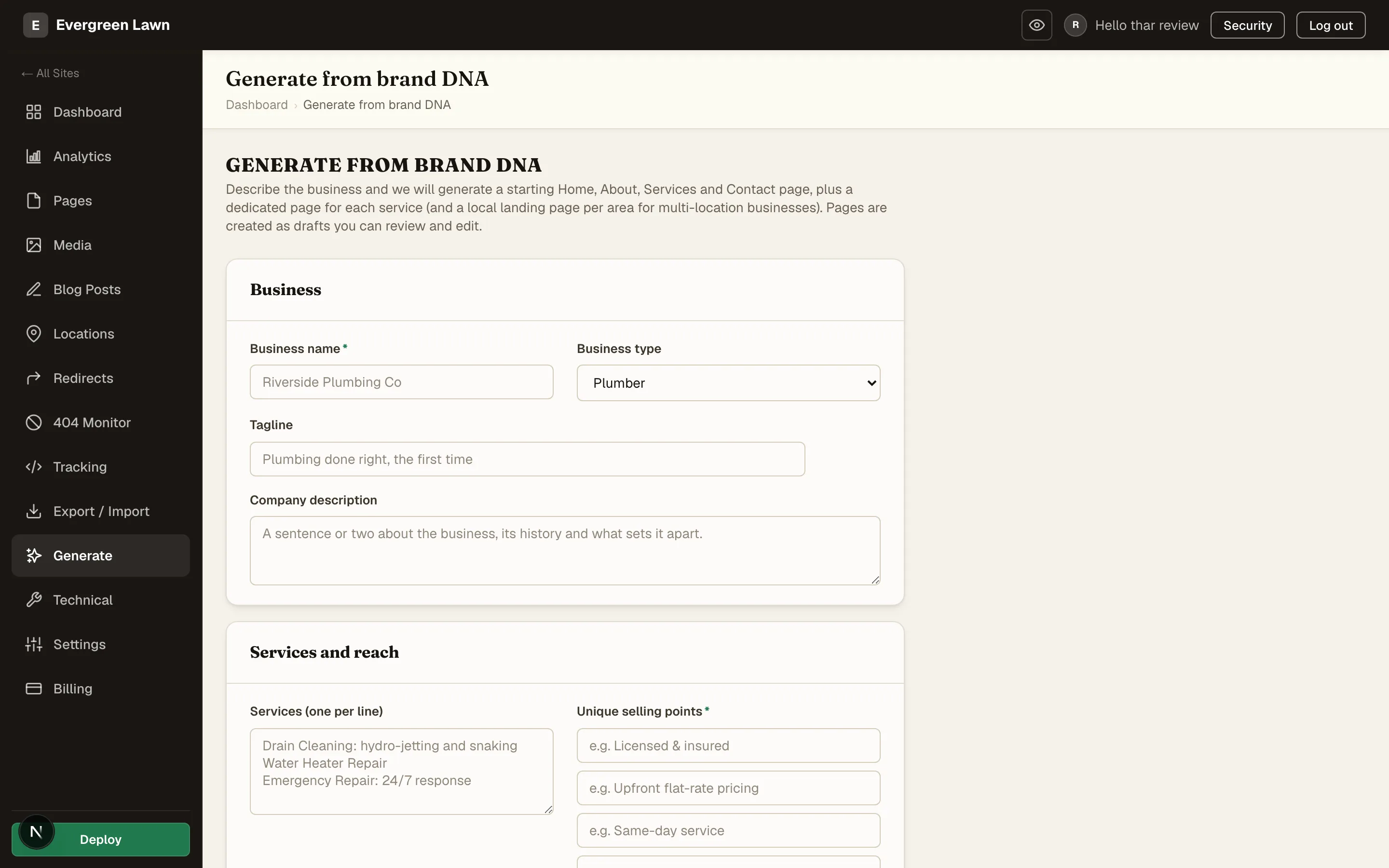
Operators also have a shortcut. Generate in a site's sidebar opens the Generate from brand DNA form, where you type the business details in yourself. It drafts a starting Home, About, Services and Contact page, a page for each service, and a local page per area for a multi-location business, and flags any page with content-check errors for review. It skips the client checkpoints, the voice profile, the honesty gates, and the variance engine described below, so use the intake when the client should approve the brand and the plan.
The Pipeline#
A generate run moves through the same stages, whether the client filled the questionnaire themselves or you completed it with them:
- Intake. Business details, services, service areas, brand identity (or a URL to detect one from), proof points, and the client's own voice inputs.
- Brand DNA. The inputs synthesize into the site's palette, typography, and a durable voice profile. See Site Settings and Brand DNA.
- Page plan. A keyword-grounded plan of pages, each with a focus keyword. Services and areas are de-duplicated first, and every page gets its own focus keyword, so no two pages chase the same term. Each approved location then gets a page for every service, ordered by search volume, and the client and you can trim the list at plan review. Search volumes need a keyword-data account (DataForSEO) in your instance configuration; without one the plan is built from the client's own services and areas, with no volume ranking.
- Draft build. The pages are composed from a template pack, filled with copy written in the client's voice, and structurally varied so the site is unique to that client. Every honesty gate runs on the finished copy, and anything it finds is attached to the draft for your review.
- Review checkpoints. The client approves the brand direction and the page plan, including the list of areas the site will cover. A town the platform added, because the client listed neighborhoods inside it, is marked as added and the client can remove it. You then sign off before the build starts, and the finished draft lands on your operator review board with any needs-review flags surfaced.
- Operator deploy. You review the draft in the builder, publish, and deploy.
The Intake Questionnaire#
The client fills in the raw material a good site is built from:
- The business - name, what they do, the services to feature, the areas they serve
- Brand - logo and colors, or a website URL to detect a palette and type from
- Proof points - the real, specific facts they want the copy to lean on (years in business, certifications, a genuine award), which double as the whitelist the honesty gates check generated claims against
- How you talk - a few sentences the client would actually say to a customer, plus whether they read as plainspoken or polished and warm or all-business
- Photos and a starting look - their own photos, which the build uses ahead of stock images, and the template pack they like the look of
Those last "How you talk" inputs are what let the platform write the copy in the client's voice rather than a generic template register. See Copy in the Client's Voice.
Copy in the Client's Voice#
Generated copy is written to sound like the client, from the voice inputs above and, optionally, from the tone of the writing already on their own site and in their Google reviews. Harvested writing only ever informs tone; it never becomes a quoted phrase or a stated fact. The full mechanics are on Copy in the Client's Voice.
Unique by Design#
Two clients in the same trade on the same template pack would otherwise receive a recognizably identical site. The variance engine gives each site built through the intake its own structure - column sides, band colors, spacing, typography scale, grids, image treatment, and photo selection - within brand-safe, accessibility-checked bounds, and re-rolls any build that comes out too close to one you already made. See Never the Same Site Twice.
Honesty Gates#
Generated copy is checked before the draft is handed to you. A claim the client did not actually give you does not stop the build: the pages are still saved as drafts, and each finding is listed on your review board with the page and block it sits in, so you fix it before publishing rather than discover the fiction on the live site.
Flagged unless the client supplied it:
| Claim type | Examples | Rule |
|---|---|---|
| Fabricated stats | "17+ years", "since 1998", "over 500 homes served" | A number-shaped claim must trace to a real fact the client provided, or it is flagged |
| Rating and award proof | "5-star rated", "top rated", "award winning", "A+ BBB rating" | A rating or accreditation claim must be a proof point the client actually supplied |
| Superlatives | "the best plumber in town", "unbeatable", "#1 in the area" | A market-superiority boast is allowed only when the client typed it themselves; any other is flagged |
Also enforced on the built-in template packs:
- No borrowed identities. A template pack can never ship a real reviewer's name, a source business's contact details, or a source business's live form embed. The pack checks (
seedly template-qa) look for this in every pack, including one you add yourself, so a generated site does not route a client's leads to someone else's inbox or quote a stranger as a happy customer. - No fabricated proof in images. A rating badge or "5-star" claim carried in an image, its alt text, or a filename is caught the same way body copy is.
Advisory checks (never block, always surface):
- Generic, AI-sounding stock phrasing is flagged for review.
- Two clients whose hero copy comes out very similar are flagged so you can differentiate them.
You decide what to do with an advisory at the review board; the hard gates decide themselves.
How the Build Wires Pages Together#
Beyond writing copy, the build makes structural decisions that keep a generated site coherent, especially a multi-location one:
- Location bindings by page type. Each generated page arrives with its location binding already set from what kind of page the plan says it is, so a city's service page opens bound to that city's location and every
{{location.*}}token on it resolves correctly from the first render. - Cross-links stay local. The related-services grid on a service page links to that page's own location set: one city's service pages interlink among themselves rather than sending a visitor sideways to another city's version of the same service.
- The services grid fits the client. A template authors one service tile; the build deals the client's actual services across it and grows the grid past its authored capacity when there are more services than tiles, so a client with fourteen services gets fourteen cards from a one-tile template and nothing is silently dropped.
- Meta comes from the template. A template page can carry its own per-page meta prompt, and pages built from it inherit it; the site-wide prompt-driven meta templates fill in the rest.
This Wiring Is Yours to Change#
These rules are ordinary code in the platform you own, not fixed behavior behind an API. They reflect one opinionated way of building local-service sites: locally scoped cross-links, per-city bindings, a services grid that grows. If the sites you build want different wiring, say a portfolio agency that wants global cross-links, or single-location builds where the binding logic is irrelevant, the build pipeline is in your source to adjust, the same way you would adjust anything else you own. Change it in the source with your own development workflow; the AI agent API edits page content, not the build pipeline.
Drafts Only, Always#
Like every content flow, generation never publishes and never deploys. The finished site lands as drafts on your operator review board, honesty-gated and variance-checked, waiting for you to review, finish in the builder, and deploy. A generated site cannot reach a visitor without an operator pressing Deploy.
Summary#
| Question | Answer |
|---|---|
| Input | An intake questionnaire the client fills in, or that you complete with them |
| Output | Draft pages in the client's brand and voice, unique to that client |
| Copy | Written in the client's voice, honesty-gated against fabricated claims |
| Uniqueness | Structurally varied per client and re-rolled if too close to a prior build |
| Publishes anything? | Never - drafts only, you review and deploy |
| When to use it | A new client with no site worth porting |
Frequently asked questions
- Who fills out the intake questionnaire?
- The client does. You invite them, they receive a link, and they fill in their own business details, brand, proof points, and voice inputs, which drive the generated site. You can also walk them through it or complete it on their behalf when that is easier.
- Does a generated site publish itself?
- No. Generation produces draft pages that land in the operator review board. Nothing publishes and nothing deploys until you review the draft and do both yourself.
- Will two clients in the same trade get the same generated site?
- No. A site built through the client intake is structurally varied per client and checked against prior builds, so two clients on the same template pack never receive a recognizably identical site. See Never the Same Site Twice.
- Can the generated copy invent facts about the business?
- A site built through the client intake is written only from facts the client supplied, and honesty gates check every page for a stat, rating, or superlative the client did not give you, such as "17 years in business" or "5-star rated". Anything that slips through is listed against its page on your review board, so you fix it before you publish.
- How is this different from porting a site?
- Porting reproduces a client's existing website. Generating builds a fresh site from the client's brand inputs when there is no site to port, or when the old one is not worth keeping.