
Help Center
Managing Client Sites
Create and manage client sites (tenants) from one login - site intake, deploy status, white-label branding, and the agency layer.
Last updated
Every client website in Seedly Sites is a tenant: its own pages, blog, media, settings, users, and Cloudflare Pages project, managed alongside all your other client sites from one operator login. This page covers creating sites, the per-site dashboard, and the white-label layer.
Creating a Site#
- From the operator portal, click + Create new site
- Fill in the intake:
| Field | Description |
|---|---|
| Site name | The client's business name, shown across the portal |
| Slug | URL-safe identifier (for example grantbrothers) - used in portal URLs and the hosting project name |
| Primary brand color (optional) | The site's starting brand color |
| Custom domain (optional) | The client's domain, if you already know it. For a site that already exists, the domain is set in /admin instead |
- Click Create site
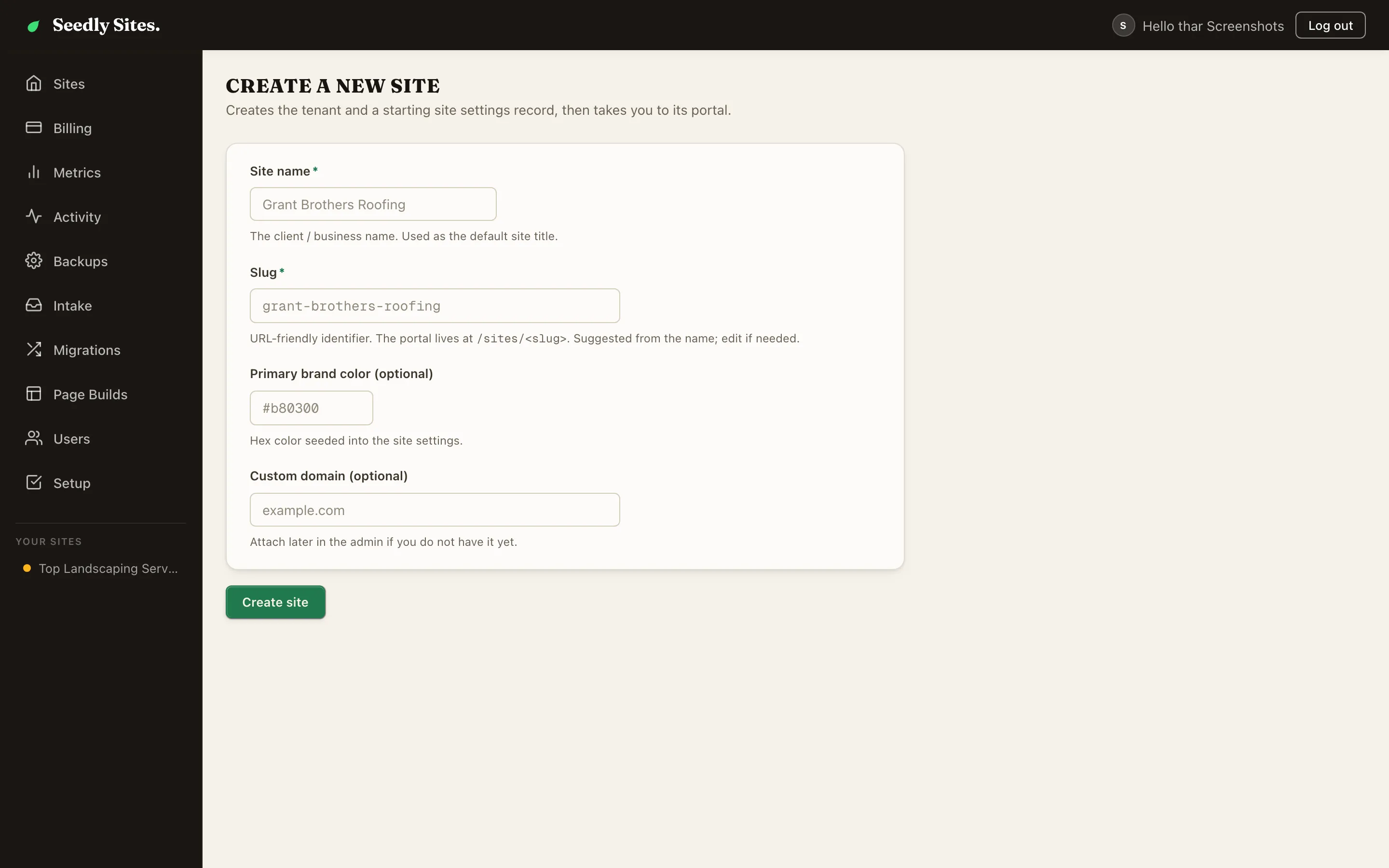
Creating a site automatically provisions its own Cloudflare Pages project, so it is ready to deploy from day one. New sites also get starter legal pages (privacy policy and terms) seeded as editable pages.
There are several ways to fill a new site with content:
- Port an existing site - migrate the client's current website into the builder
- Clone a site - import a live site as a near-exact copy, as drafts you review
- Generate a site - build a starting multi-page draft from the client's brand inputs (needs your Anthropic key)
- Build in the builder - start from section presets and saved blocks
The Site List and Dashboard#
The operator portal lists every site with its deploy status at a glance. Opening a site lands on its dashboard: pages, blog, media, analytics, settings, redirects, and the sidebar Preview and Deploy buttons.
Each site shows:
| Signal | Meaning |
|---|---|
| Deploy status | Pending / Building / Live / Failed |
| Last deployed | When the live site last shipped |
| Custom domain | The site's production domain, once set |
Each site gets its own hosting project, so two sites can never end up publishing to the same place.
Deleting a Site#
Deleting a site removes everything it owned: its pages and posts, its media in storage, and its hosting project. Nothing is left behind quietly consuming storage or holding a project name you want to reuse. Three things are deliberately kept: user accounts (only their access to this site is removed, since a user can belong to other sites), your platform backups, and the custom domain's DNS record at your registrar, which is yours to remove.
This is not reversible. Take a backup first if there is any chance the client comes back, and if they are leaving for good, send them their takeout bundle before you delete.
The Agency Layer#
Sites belong to an agency - the white-label parent that groups your client sites. The agency record carries:
| Field | Purpose |
|---|---|
| Name + slug | The agency identity |
| Contact email / phone | Agency contact details |
| Logo | Agency branding |
| Primary color | Agency brand color |
| Max tenants | Cap on how many sites the agency can hold (0 = unlimited) |
| Active | Agency account status |
For a single-agency install (the common case), you have one agency that owns everything. The layer exists so access can be scoped cleanly: users belong to an agency, sites belong to an agency, and nobody sees across that boundary except the operator.
White-Label: What Clients See#
The white-label story, stated honestly:
What is branded:
- The login screen - once you set your logo (
NEXT_PUBLIC_ADMIN_LOGO_URL) and brand name (INSTANCE_BRAND_NAME) on the cms service, clients see your logo and name when they sign in, not ours. Until you do, it shows the Seedly Sites name - The published sites - clean static output with no "powered by" badge, no builder watermark, nothing pointing back to the platform
- Custom domains - every client site lives on the client's own domain
What is not branded:
- The admin and editing interface itself is the platform's standard UI - it is not recolored per agency
- Email sender identity (password resets, invitations) is configured once for your whole instance, not per client
For most agencies this is exactly the right line: the client-visible surfaces (login, their website) carry your brand, and the working tools stay standard.
Inviting a Client into Their Site#
Create a user scoped to just their site with an appropriate role - typically Editor. They log in through the branded login screen and can only see and edit their own site. Roles and per-site access are covered in Users and Roles.
Billing per Site#
Each site can carry its own Stripe subscription (your client paying you), with per-site enforcement if payment lapses. See Billing.
Summary#
| Task | Where |
|---|---|
| Create a client site | Operator portal, + Create new site |
| Fill it with content | Port a site or build in the builder |
| Give the client access | Users and Roles |
| Put it on their domain | Hosting and Domains |
| Charge for it | Billing |