
Help Center
Cloning a Live Site
The third way to create a site - clone makes a near-exact copy of a live site into a tenant, as drafts, with no keyword research and no generated copy.
Last updated
Cloning is the third way to fill a new client site, alongside porting and generating. It makes a near-exact copy of a live site into a tenant: real content, real chrome, real images, as drafts you own and can edit.
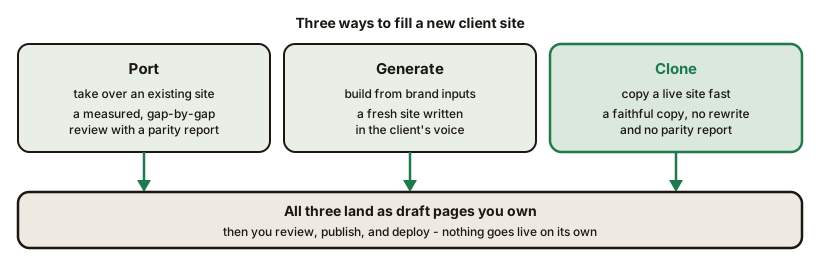
Reach for clone when you want a plain, faithful copy of a site into the platform quickly, without the parity-report takeover workflow of a port and without the keyword plan and rewritten copy of a generate run.
What Cloning Does#
Given a live URL and a target tenant, cloning brings over:
- The real page content, with semantic headings, as native builder elements
- Images, imported into your own media storage
- Brand and logo - the site's colors, fonts, and mark
- Navigation and business details (name, address, phone)
- The site chrome - header and footer, rebuilt in the builder
- Internal links relativized so pages point at each other, not back at the source
Every page lands as a draft. The tenant is created for you if it does not exist yet.
What It Does Not Do#
Cloning is deliberately plainer than the other two flows:
- No keyword research and no page plan. You get the source's pages as they are.
- No generated or rewritten copy. The real prose comes across unchanged. Writing copy in the client's voice is the generate flow.
- No parity scoring. There is no coverage report to work through; if you want the measured, gap-by-gap takeover workflow, port the site instead.
- No forms. As with porting, a scraped form would still post to the old host, so re-add each form as an embed.
Running a Clone#
From the platform repo, with your CMS running:
PAYLOAD_TOKEN=<your session token> npx pnpm --filter @seedly-sites/cli seedly clone https://the-source-site.com client-slug \
  --cms https://your-cms.example.com
The tenant is found or created by slug, the pages are captured and persisted as drafts, and the capture workspace is discarded afterward.
There is no bare seedly command on your machine; the CLI runs through pnpm from the platform folder. Clone signs in as you with a session token in PAYLOAD_TOKEN and stops without one. SETUP/operations/adding-a-tenant.md in your download shows how to copy that token from your browser, including the Windows form of the command.
Choosing Between Port, Generate, and Clone#
| You want to | Use |
|---|---|
| Take over a client's existing site with a measured, gap-by-gap review | Port |
| Build a fresh site from a client's brand inputs, in their voice | Generate |
| Make a quick, faithful copy of a live site as editable drafts | Clone |
After a Clone#
The cloned pages are ordinary builder pages from here on. Review them, adjust anything the capture did not carry perfectly, re-embed forms, set the brand and custom domain, then publish and deploy on your own schedule. Nothing goes live until you deploy.
Frequently asked questions
- How is cloning different from porting?
- Porting reproduces a site and hands you a parity report of the remaining gaps, meant as the start of a full takeover. Cloning is a faster, plainer near-exact copy - real content and chrome as drafts, with no keyword research, no generated copy, and no parity scoring.
- Does a clone publish anything?
- No. Every cloned page lands as a draft in the target site. You review, publish, and deploy yourself.
- Does a clone rewrite the copy or the brand?
- No. Clone keeps the real content and brand as-is. Rewriting copy in the client's voice and building a keyword page plan are the generate flow, not clone.