
Help Center
Backups & Data Export
Protect your Seedly Sites instance - Postgres and media backups, disaster recovery, and portable per-client content export.
Last updated
Your platform's state lives in three places. A real backup plan covers all three.
What Holds Your State#
- Postgres (on Railway) - all your content: sites, pages, blog posts, media records, settings, users. This is the big one.
- R2 (on Cloudflare) - the actual media files clients uploaded.
- Your secrets - the environment variables on Railway and GitHub, and your local env file. These are not in the database; if you lose them, you cannot authenticate even with a perfect data backup.
The Built-In Backups#
The platform backs up your Postgres content itself. A super admin can create, download and restore a backup by hand from Backups in the operator dashboard (/operator/backups), and an automatic backup runs on a schedule and keeps a rolling set of recent ones. Your CMS runs the automatic backup itself. Your GitHub repo also runs it until you run npx pnpm run setup:scheduler, and while both run it, your kept backups reach back half as far.
- Durable automatic backups need R2. With your R2 credentials set on the cms service, backups are written to R2. Without them a backup lands on the container's own disk, which Railway wipes on every redeploy and restart.
- It covers content, not files. Each backup is a snapshot of your Postgres content (sites, pages and their versions, posts, media records, settings, redirects, and users with password hashes removed). It does not copy the media files in R2; the R2 sync below covers those.
The Railway snapshots and manual dumps below are extra layers on top of this. Do them too.
Postgres Backups#
- Railway snapshots. Railway's Postgres offers scheduled backups; enable them in the Postgres service settings and know your retention window.
- Manual dump before risky changes. Before a version update or a large data operation, take your own dump and keep the file off-platform. Your Railway database has no public address by default, so run
pg_dumpinside Railway and let it stream back to your computer withrailway ssh -s Postgres -- pg_dump > backup.sql(this needs the Railway CLI installed and linked). Do this whenever you are about to do something you are not sure about. - Restore drill. A backup you have never restored is a hope, not a backup. Do one restore into a scratch database in your first month so you know the steps cold.
Media (R2) Backups#
R2 is durable, but a bad delete is still a bad delete. Periodically sync the bucket to another location (a second bucket, or S3) with any S3-compatible tool using your R2 credentials. At minimum, do this before any bulk media operation.
Secrets Backup#
Store every environment variable value in a password manager or encrypted vault: the platform's generated secrets, your provider keys, and your local env file. Losing the session-signing secret in particular signs everyone out and invalidates signed tokens.
Per-Client Content Export#
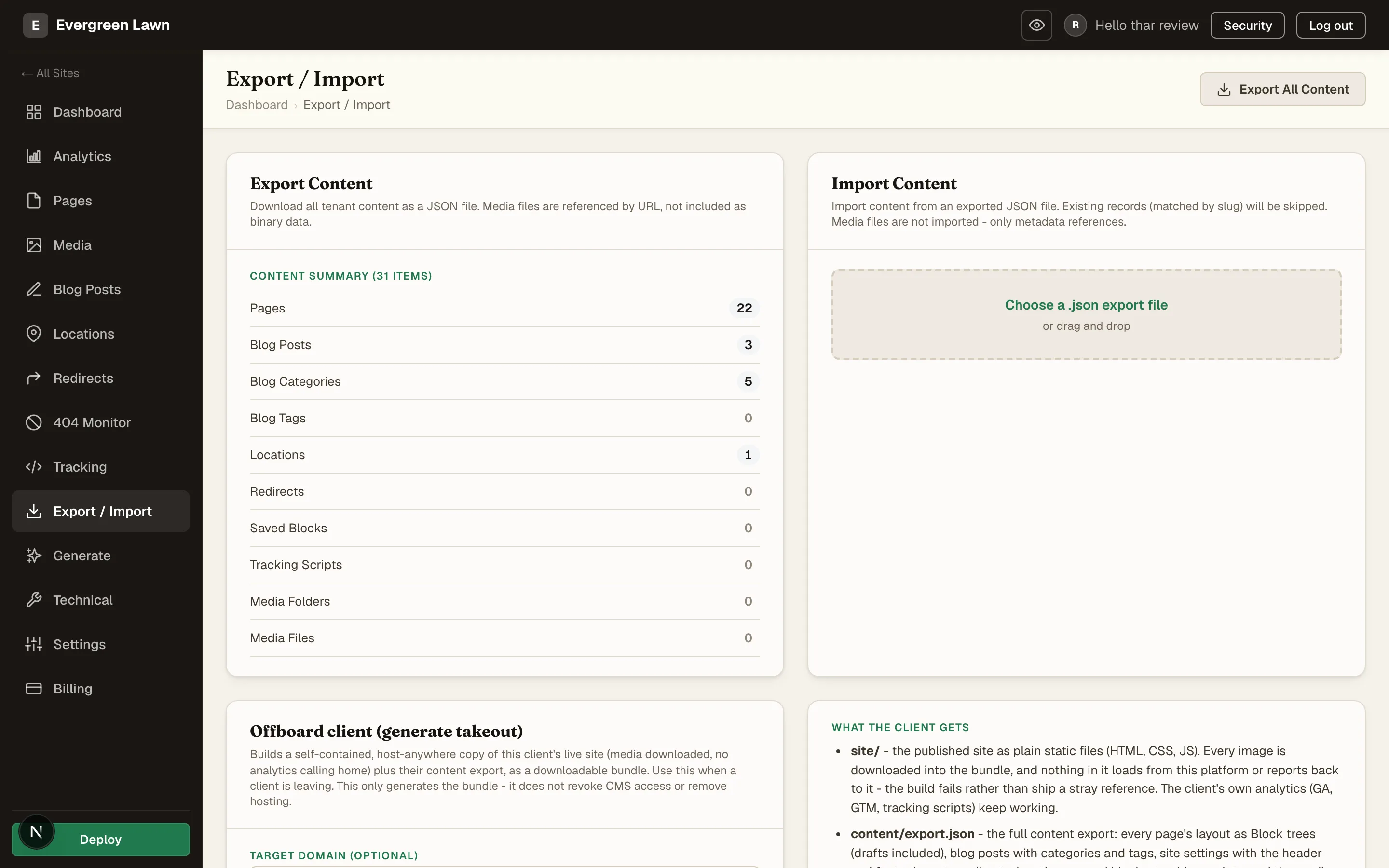
Backups protect the whole platform. When you need just one client's content, to hand a leaving client their site or to move a site between instances, each site has its own Export / Import tab.
Export All Content downloads that site's pages, blog posts, categories, locations, redirects, and settings as a single JSON file. Media is referenced by URL, not bundled. Import reads an export back in and skips any record whose slug already exists, so a re-import is safe.
The Offboard client action goes further: it builds a self-contained, host-anywhere copy of the client's live site, every image downloaded into the bundle and nothing calling back to the platform, alongside the content export. Use it when a client is leaving; it only generates the bundle and never revokes access or removes hosting.
If You Delete Something by Mistake#
- A single record (a page, a post): restore just that record's data from a recent backup rather than rolling everything back. If it was only unpublished, not deleted, just re-publish; remember deploys are separate from data.
- A whole site's content: restore your most recent snapshot into a scratch database, extract that tenant's rows, and bring them back. Do not restore a whole snapshot over the live database while other clients are active unless you accept losing everyone else's changes since that snapshot.
The golden rule: never restore a full backup over a live production database without first taking a current dump of that live database. A restore is destructive; give yourself a way back.
Data Export (Client Takeout)#
A client may leave with their site, or you may want a portable copy of one site's content. Portability is a feature of the platform, not an afterthought.
Two Kinds of Export#
- The published static site. Every site publishes as clean, self-contained static files (HTML, CSS, images). Those files ARE the site, with no runtime framework to carry along; a client can host that output anywhere.
- The content bundle. The portal includes a per-site takeout/offboarding export that packages the site's pages, posts, media, and settings for handoff, so the content itself (not just the rendered output) can move. Open the site and use its Export / Import surface.
The Export / Import screen explains what a departing client actually receives and how they can use it with any host or developer, so you can show them rather than describe it.
The bundle is checked before you get it. If any image in the export still points back at this platform, or is referenced but missing from the bundle, the build fails and tells you, rather than handing over an archive that looks complete and renders with broken images on the client's new host. A takeout that succeeds is self-contained.
Handing Over a Live Site#
If a client is taking their domain with them:
- Give them the published static output.
- They point their domain's DNS at wherever they will host next.
- Once they confirm the cutover, clear the custom domain on the tenant in
/admin(Tenants, open the client) and remove it from Cloudflare.
Do not delete the tenant or its hosting project until the client confirms they are fully moved. Deleting hosted environments is a one-way action.
Privacy Requests#
If a client asks you to delete their data (not just export it): export first, then remove the tenant and its media, and record that you did so. Keep whatever you are legally required to keep (billing records, for example) separately.