
Help Center
Page SEO
Per-page and per-post SEO controls - focus keyword, meta title and description, social share cards, canonical URLs, noindex, and custom schema.
Last updated
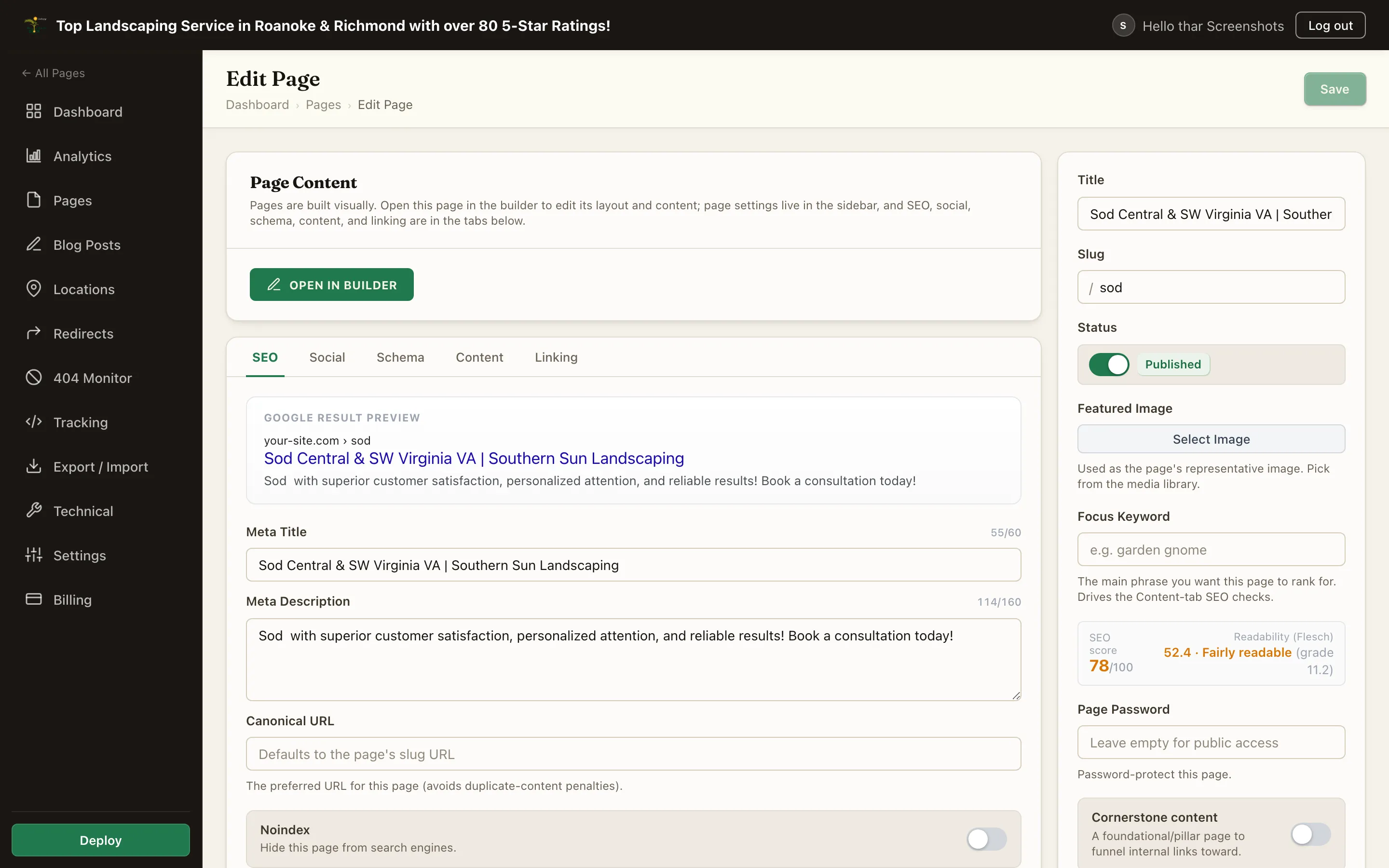
Every page and blog post carries the same SEO controls in its editor: the SEO, Social and Schema tabs, plus Focus Keyword in the sidebar. Set what matters, leave the rest empty - sensible fallbacks fill the gaps, and the site-wide templates in the Technical tab cover anything a page does not set itself.
Like all content changes, SEO edits reach the live site on the next Deploy.
Focus Keyword#
The main phrase this page should rank for. It does not render anywhere; it drives the Content / SEO analysis checklist in the editor, which checks the keyword's presence in the title, H1, meta description, slug, and body, alongside readability and length checks. One page, one intent, one focus keyword.
Meta Title and Description#
| Field | Fallback when empty |
|---|---|
| Meta Title | The page title, formatted by the site's meta title template |
| Meta Description | Filled in when you publish, from the page's first real sentence (switched-off blocks are skipped, and a page with no usable text uses its title); posts use the excerpt. A page that still has none uses the site's Default OG Description, then the description template |
Guidelines:
- Meta descriptions read best at 150-160 characters; the editor shows live character counters and a SERP preview.
- Clearing the description stops the autofill from ever filling it; the page then uses the site's Default OG Description or description template, if one is set.
- The boxes never cut off what you type, and an auto-filled description is shortened on a whole word, marked with an ellipsis, rather than cutting a word in half.
Length is a guideline, not a grade. Title and description length are no longer scored in the SEO analysis. The counters and the preview stay, so you can still see when a title will be truncated in results, but writing to hit a character count was pushing people toward worse titles than writing for the reader.
Social Share Card#
One card serves Facebook and X:
| Field | Fallback when empty |
|---|---|
| Social Title | The meta title |
| Social Description | The meta description |
| Social Image | The OG image upload, then the featured image, then the site's default OG image |
Recommended OG image shape is wide (1.91:1). The editor's social preview shows how the card will look. The site-wide default OG image and default featured image are set in the Technical tab, so even a page with nothing set still shares with a branded card.
Canonical URL#
Defaults to the page's own URL on the site's domain. Override it only when this page is a duplicate of another URL that should get the ranking credit (for example, a syndicated article's original source).
Noindex#
Switching on Noindex asks search engines not to index the page, and the platform backs it up: a noindexed page is also excluded from the sitemap (and a noindexed post from the RSS feed). Use it for thank-you pages, campaign landing variants, or thin utility pages.
To take an entire site offline from search (a staging site, for example), use Staging Mode in the Technical tab instead of noindexing pages one by one.
Custom Schema (Advanced)#
Pages emit structured data automatically - WebPage, breadcrumbs, article markup on posts, plus the site-level business schema (see Site SEO). The Custom Schema (JSON-LD) box on the Schema tab lets you add to that: paste a JSON-LD node (or array of nodes) and it is merged into the page's single structured-data graph - a new type adds an entity, a matching id augments an existing one. No script tags; just the JSON. Leave it empty for the automatic schema only.
Summary#
| Control | Use it for |
|---|---|
| Focus Keyword | Driving the on-page analysis checklist |
| Meta Title / Description | The search-result snippet |
| Social Title / Description / Image | The share card on Facebook and X |
| Canonical URL | Duplicate-content edge cases only |
| Noindex | Keeping utility pages out of search (auto-excluded from sitemap) |
| Custom schema | Extra JSON-LD merged into the page's graph |