
Help Center
Element Reference
Complete reference of all 50 Seedly Sites element and block types, organized by category - layout, content, media, interactive, and local business.
Last updated
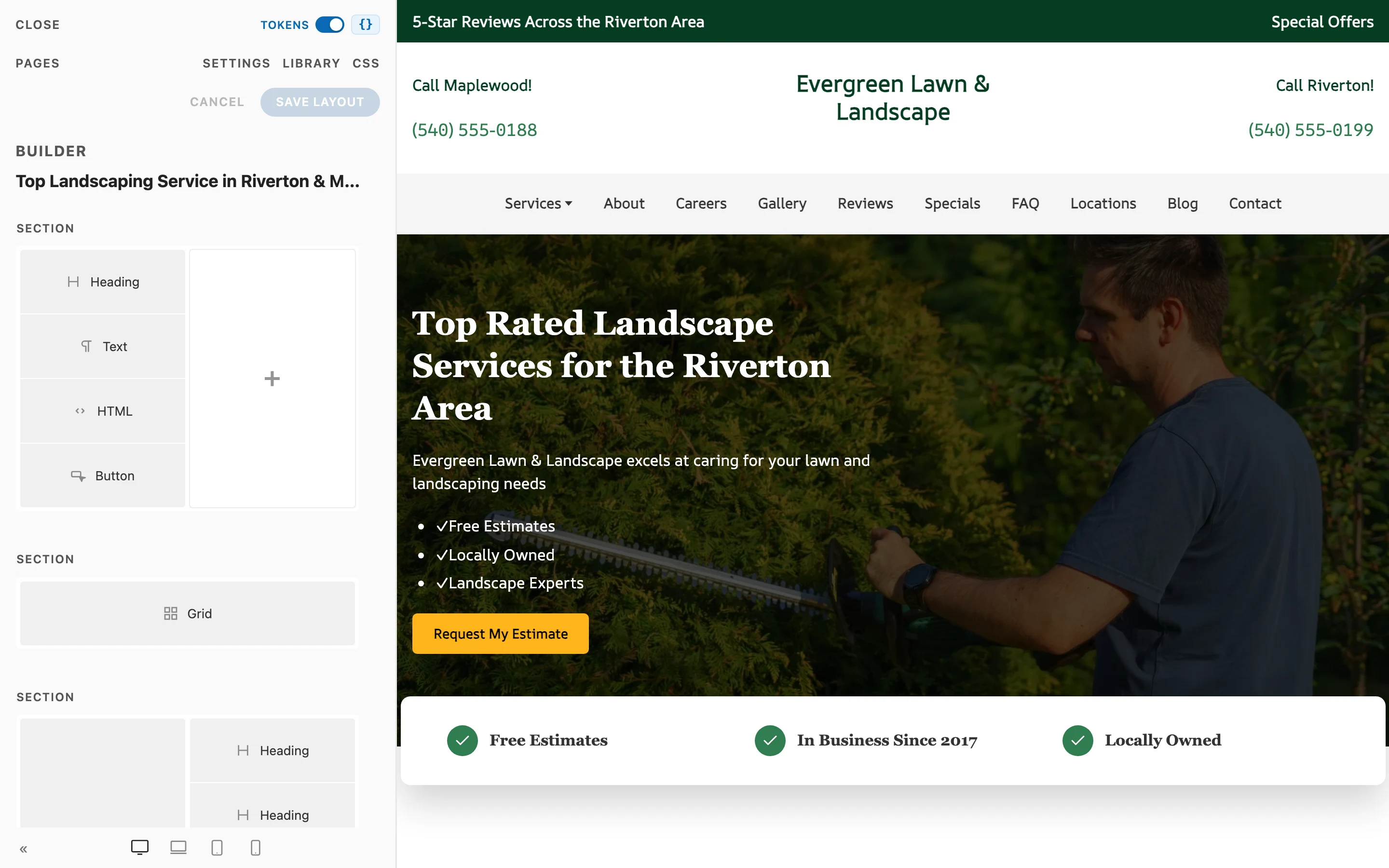
Every element and block type available in the visual builder: 50 types in all - the Section, Row, Column layout trio, 35 standalone elements and blocks you place from the library, and 12 item types that live inside their parent containers. Add any of them from the builder's element library; the per-category guides linked in each section cover the settings in depth.
Two general notes:
- Containers and items. Multi-item elements (Button, Grid, Accordion, Slideshow, List, FAQ, Image Gallery, Map, Reviews, Switcher, Table) hold item children. You do not add an item from the library; you add it inside its container, and each item carries its own content while shared settings stay on the container.
- Almost every element carries the same Advanced surface (name, status, id, class, attributes, custom CSS) plus its own native fields; item types, the Share Bar, and the blog template elements leave out the custom CSS box. Reach for the native fields first; see Builder Basics.
Layout (3)#
The enforced page hierarchy: pages are stacks of Sections; Sections hold Rows; Rows hold Columns; Columns hold everything else. Guides: Sections, Rows & Columns.
| Element | What It Does |
|---|---|
| Section | A full-width horizontal band and the root of any page. Background image or color with overlay, style presets, text color, container width, mobile-aware padding, shaped edges (a wave shape and top or bottom dividers), and visibility controls |
| Row | The layout grid inside a Section. Carries the column layout preset (Whole, Halves, Thirds, asymmetric splits, and more) plus gaps, alignment, max width, and margins |
| Column | One cell of a Row and the container elements actually sit in. Per-breakpoint widths and ordering, background image or color with overlay, and padding |
Content & Text (7)#
Guide: Text Elements.
| Element | What It Does |
|---|---|
| Heading | A semantic heading (h1 through h6) with size, color, alignment, and max width. Supports safe inline HTML like line breaks |
| Text | A rich-text paragraph block with optional multi-column layout, text style and color, and max width controls |
| List | A styled list with bullet, divider, striped, and other variants; each entry is a List Item |
| Quotation | A pull quote with optional attribution and citation link |
| Divider | A horizontal separator with icon, small, or vertical style variants |
| Feature Item | An icon plus title plus body cell; drop several into a Grid to build a feature list |
| Table | Real tabular content for pricing grids and service comparisons. Header-row toggle, four looks (divided, striped, bordered, plain), comfortable or compact density, a table-wide cell alignment any cell can override, and a phone behavior: scroll sideways in its own container, or stack each row into a card that repeats the column headings. Publishes as a semantic <table>, so it reads correctly for search engines and screen readers |
Media (5)#
Guide: Media Elements.
| Element | What It Does |
|---|---|
| Image | A responsive image with dimensions, focal point, optional lightbox link, SVG handling, and border styles |
| Image Gallery | A packed grid of images (grid or masonry), bulk-added from the media library, with columns, gaps, and corner radius |
| Video | A video file from the media library or a pasted link (YouTube and Vimeo links play in an embedded player), with autoplay-in-view, aspect ratio control, and an optional poster image |
| Icon | A single icon with size, color, link support, and optional button or link styling |
| Overlay | An image with positioned text layered on top - captions, hover reveals, hero treatments |
Interactive (10)#
Guide: Interactive Elements. Grid has its own page: Grids.
| Element | What It Does |
|---|---|
| Button | A button group; shared size, gap, and full-width settings on the container, per-button label, icon, link, and style on each Button Item |
| Grid | The multi-item panel grid: each item is a panel (icon or image, title, text, link) with responsive column counts, icon position and background, and card-or-button link display |
| Accordion | Expanding panes; shared behavior (multiple open, collapsible) on the container, per-pane title, content, icon, image, and link |
| FAQ | A schema-aware question-and-answer list that emits FAQ structured data for rich results |
| Slideshow | Sliding panels with animation, autoplay, ratio, and navigation settings; per-slide title, content, media, and link |
| Switcher | Tabbed content: a tab bar (tabs, pills, or nav styles, positioned top, bottom, left, or right) paired with switchable content panes |
| Reviews | Customer reviews in list, grid, or carousel layout, emitting review structured data per item; a Connected source renders auto-updating reviews pulled from your connected platforms |
| Popup | A modal with load, delay, scroll, and exit-intent triggers, positioning, show-once, and a call to action |
| Panel | A boxed content panel with optional title, rich-text body, image, and link |
| Before / After Slider | Two images stacked with a draggable divider a visitor wipes across to compare the before and after, in a horizontal or vertical orientation |
Local Business (7)#
Blocks that read the site's business details from Settings and emit local-SEO structured data. Guide: Local Business Blocks.
| Element | What It Does |
|---|---|
| NAP | Name, Address & Phone card with business and address structured data. It shows exactly what you type; a field left empty is left out |
| Hours | Opening-hours table from an inline weekly schedule or the hours captured on your primary Location, with an optional Open now / Closed badge worked out when the site is deployed |
| Service Area | Geographic service area: heading, description, region list, and an optional map |
| Service | A single named service (title, description, optional CTA) emitting Service structured data linked to the business |
| Click to Call | A phone-link button, optionally showing the formatted number |
| Map | An interactive map with brand-colored pins and get-directions popups, linked to the site's Locations. No API key required |
| Breadcrumb | A visible breadcrumb trail matching the page's breadcrumb structured data |
Embeds (1)#
| Element | What It Does |
|---|---|
| HTML / Embed Code | Raw HTML or embed code rendered verbatim - CRM forms, review widgets, map iframes, custom snippets. Server-rendered so embeds actually execute. See Forms |
Site Chrome & Blog Template (5)#
Settings-bound elements for the header/footer builder and the blog templates. Guides: Header & Footer, Blog.
| Element | What It Does |
|---|---|
| Menu | The navigation menu, bound to the site's nav settings: desktop menu with dropdowns plus a mobile hamburger. Place it in the header builder |
| Logo | The site logo, bound to the site's logo and name settings, with size and link controls. For the header/footer builder |
| Blog Posts | The paginated blog listing, full roll-plus-sidebar or roll only, with the built-in heading toggleable. Place it in the blog-archive template |
| Blog Post | Marks where the post article and sidebar render in the post template; add Sections above and below to frame every post |
| Share Bar | The post-footer share row (X, Facebook, LinkedIn) and back-to-blog link as a placeable block, for framing the post template's footer |
Item Types (12)#
Added inside their parent container, never directly from the library. Each carries its own content while shared settings live on the container.
| Item | Lives Inside | Carries |
|---|---|---|
| Button Item | Button | Label, icon, link, per-button style override |
| Grid Item | Grid | Panel icon or image, title, text, link |
| Gallery Image | Image Gallery | One image with alt text, plus an optional title, meta line, and link for the Overlay caption |
| Accordion Item | Accordion | Pane title, content, icon, image, link |
| Slideshow Item | Slideshow | Slide title, content, media, link |
| List Item | List | One list entry |
| FAQ Item | FAQ | One question and answer |
| Location | Map | One pin - a linked Location or inline address and coordinates |
| Review | Reviews | One customer review - author, rating, quote, and source |
| Switcher Item | Switcher | One tab and its content pane - title with heading size, meta text, icon, image with position, rich-text body, and a button link |
| Table Row | Table | One row inside the Table. Holds its own cells and carries the row's own options |
| Table Cell | Table Row | Rich-text content, plus an Alignment that can override the Table's cell alignment |
Summary#
| Category | Types |
|---|---|
| Layout | 3 |
| Content & Text | 7 |
| Media | 5 |
| Interactive | 10 |
| Local Business | 7 |
| Embeds | 1 |
| Site Chrome & Blog Template | 5 |
| Item types | 12 |
| Total | 50 |